> For the complete documentation index, see [llms.txt](https://track360.gitbook.io/track360/llms.txt). Markdown versions of documentation pages are available by appending `.md` to page URLs; this page is available as [Markdown](https://track360.gitbook.io/track360/section-6-marketing-tools/editor/6.4-tracking-direct-links.md).
# 6.4 Tracking/Direct Links
* **Direct Links** allow you to use URLs to promote the Brand. These links are associated each one with a specific product.
* **Tracking link workflow to track affiliate's performance**
* 1\. A unique tracking link is generated per affiliate, containing parameters such as `affiliate_id`, `campaign_id`, `click_id`, and any additional parameters the affiliate wishes to pass.
* 2\. When a potential customer clicks the link, they are redirected to your homepage or registration page. If needed, two separate links can be provided, one per destination. \
On your side, the `tracking_data` must be stored in cookies and tied to that click.
* 3\. Once the potential customer registers, their data along with the original `tracking_data` must be sent back to the platform.\
This is how the system matches the customer to the correct affiliate and campaign, ensuring commissions are attributed and paid accurately.
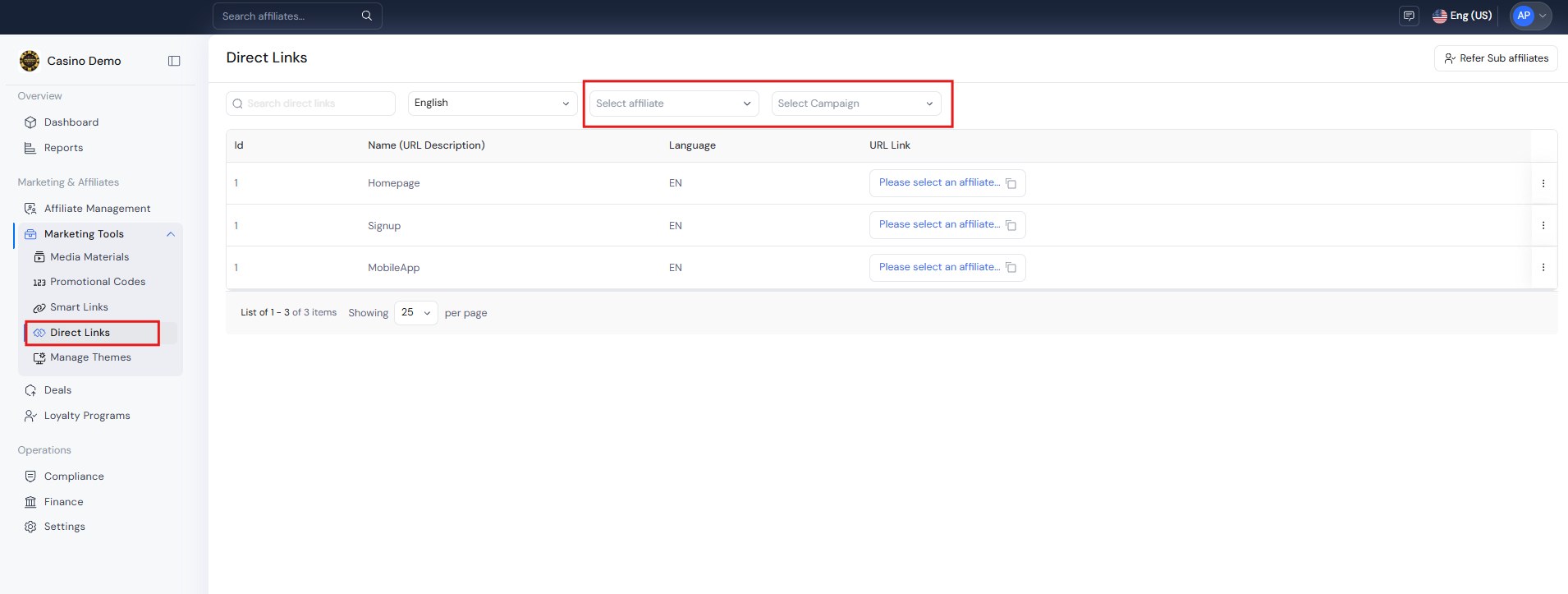
* Navigate by the **left Sidebar Menu** and click on the **Marketing Tools > Direct Links**
* Use the top bar optional filters to
* **Search bar** to search by the name of the tracking link
* Use the drill down **Language** box, to filter by the desired language
* For generate the corresponding link, **select an affiliate/IB**, to list the available quick links for that user
* Use the drill down **Campaign** box, to filter by the desired campaign (between the affiliate/IB options)
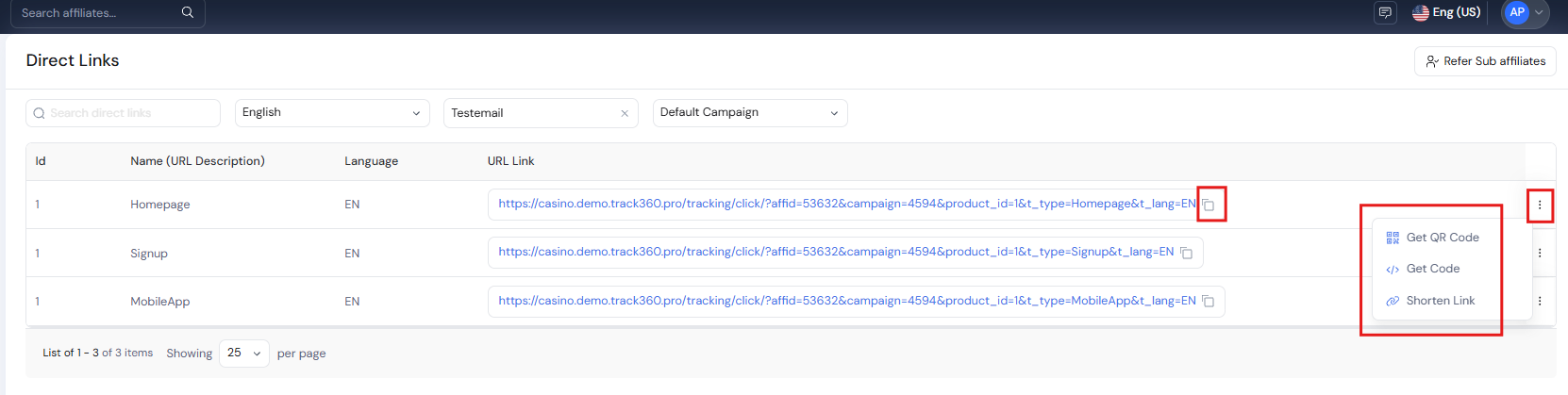
* Use the **Copy icon** next to the URL link displayed to copy **to clipboard** the desired Link, directly attached to the affiliate and campaign selected.
* Use the **Get QR Code** option in the Actions Menu of the desired Link, to create a QR code
* Use the **Get Code** option in the Actions Menu of the desired Link, to be able to copy to clipboard the link with the option to add parameters if needed.
* Use the **Short Link** option in the Actions Menu of the desired Link, to create a short link. You will see all these short links created in the Short Link section
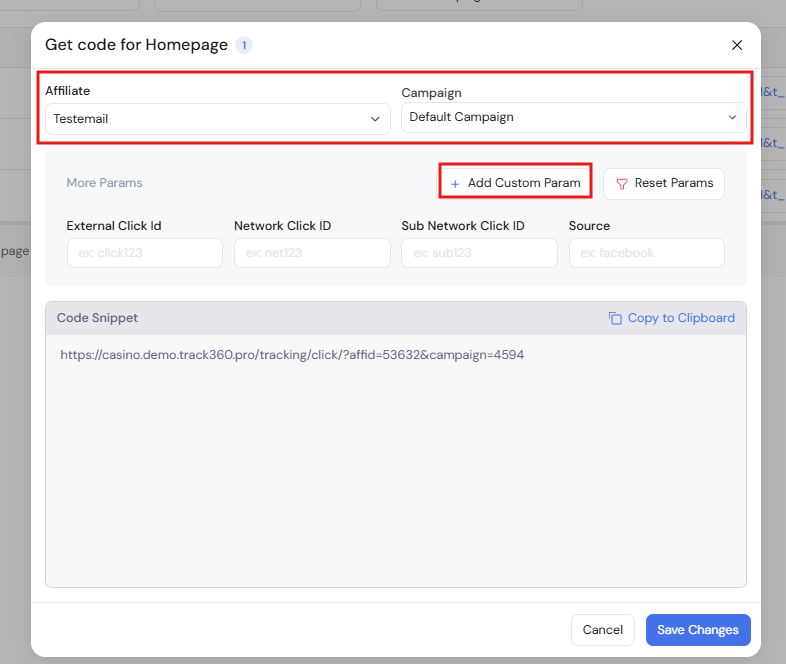
* Clicking on the **Get Code option**, a popup window will display:
* Choose between the available **Campaigns** to then track the action
* Fill **more params** if you want to add it to the Direct Link
* Use **Add Custom Param** to define specific parameter names and their values, which will be appended to the direct link. You can add as many custom parameters as needed
* Once **new parameter** is saved it will be able to **assign a value**
* Then it will be automatically displayed in the tracking link
{% hint style="info" %}
Any action taken through this link will be tracked under the selected campaign. The corresponding affiliate will be commissioned based on the deal assigned to that campaign for any customer activity performed by the link.
{% endhint %}
{% hint style="info" %}
It is possible to follow up all Clicks of the marketing tools by the [Section 4 under Reports](https://track360.gitbook.io/track360/~/changes/7/section-4-reports-and-analytics/editor/4.3-reports#clicks-report)
{% endhint %}
---
# Agent Instructions
This documentation is published with GitBook. GitBook is the documentation platform designed so that both humans and AI agents can read, navigate, and reason over technical content effectively. Learn more at gitbook.com.
## Querying This Documentation
If you need additional information that is not directly available in this page, you can query the documentation by asking a question.
Perform an HTTP GET request on the following URL with the `ask` and `goal` query parameters:
```
GET https://track360.gitbook.io/track360/section-6-marketing-tools/editor/6.4-tracking-direct-links.md?ask=&goal=
```
`ask` is the immediate question: it should be specific, self-contained, and written in natural language.
`goal` is what the user is ultimately trying to achieve, the reason they need the answer. Sharing it helps GitBook give you a better, more relevant answer. A goal is most helpful when it describes the outcome the user wants rather than restating the question. For example, with `ask=how do I create an API token`, a goal like `automate deployments from our CI pipeline` lets GitBook tailor the answer to that use case.
The response will contain a direct answer to the question and relevant excerpts and sources from the documentation.
Use this mechanism when the answer is not explicitly present in the current page, you need clarification or additional context, or you want to retrieve related documentation sections.